AD Accounts & Groups
Local Accounts
Local accounts are stored locally on a particular server or workstation. These accounts can be assigned rights on that host either individually or via group membership. Any rights assigned can only be granted to that specific host and will not work across the domain. Local user accounts are considered security principals but can only manage access to and secure resources on a standalone host. There are several default local user accounts that are created on a Windows system:
Administrator: this account has the SIDS-1-5-domain-500and is the first account created with a new Windows installation. It has full control over almost every resource on the system. It cannot be deleted or locked, but it can be disabled or renamed. Windows 10 and Server 2016 hosts disable the built-in administrator account by default and create another local account in the local administrator’s group during setup.Guest: this account is disabled by default. The purpose of this account is to allow users without an account on the computer to log in temporarily with limited access rights. By default, it has a blank password and is generally recommended to be left disabled because of the security risk of allowing anonymous access to a host.SYSTEM: The SYSTEM (orNT AUTHORITY\SYSTEM) account on a Windows host is the default account installed and used by the operating system to perform many of its internal functions. Unlike the Root account on Linux,SYSTEMis a service account and does not run entirely in the same context as a regular user. Many of the processes and services running on a host are run under the SYSTEM context. One thing to note with this account is that a profile for it does not exist, but it will have permissions over almost everything on the host. It does not appear in User Manager and cannot be added to any groups. ASYSTEMaccount is the highest permission level one can achieve on a Windows host and, by default, is granted Full Control permissions to all files on a Windows system.Network Service: This is a predefined local account used by the Service Control Manager (SCM) for running Windows services. When a service runs in the context of this particular account, it will present credentials to remote services.Local Service: This is another predefined local account used by the Service Control Manager (SCM) for running Windows services. It is configured with minimal privileges on the computer and presents anonymous credentials to the network.
Domain Users
Domain users differ from local users in that they are granted rights from the domain to access resources such as file servers, printers, intranet hosts, and other objects based on the permissions granted to their user account or the group that account is a member of. Domain user accounts can log in to any host in the domain, unlike local users. For more information on the many different Active Directory account types, check out this link. One account to keep in mind is the KRBTGT account, however. This is a type of local account built into the AD infrastructure. This account acts as a service account for the Key Distribution service providing authentication and access for domain resources. This account is a common target of many attackers since gaining control or access will enable an attacker to have unconstrained access to the domain. It can be leveraged for privilege escalation and persistence in a domain through attacks such as the Golden Ticket attack.
User Naming Attributes
Security in Active Directory can be improved using a set of user naming attributes to help identify user objects like logon name or ID. The following are a few important Naming Attributes in AD:
UserPrincipalName (UPN) | This is the primary logon name for the user. By convention, the UPN uses the email address of the user. |
ObjectGUID | This is a unique identifier of the user. In AD, the ObjectGUID attribute name never changes and remains unique even if the user is removed. |
SAMAccountName | This is a logon name that supports the previous version of Windows clients and servers. |
objectSID | The user’s Security Identifier (SID). This attribute identifies a user and its group memberships during security interactions with the server. |
sIDHistory | This contains previous SIDs for the user object if moved from another domain and is typically seen in migration scenarios from domain to domain. After a migration occurs, the last SID will be added to the sIDHistory property, and the new SID will become its objectSID. |
Common User Attributes
User and Machine Accounts
1
2
3
4
5
6
7
8
9
10
11
12
13
PS C:\htb Get-ADUser -Identity htb-student

DistinguishedName : CN=htb student,CN=Users,DC=INLANEFREIGHT,DC=LOCAL
Enabled           : True
GivenName         : htb
Name              : htb student
ObjectClass       : user
ObjectGUID        : aa799587-c641-4c23-a2f7-75850b4dd7e3
SamAccountName    : htb-student
SID               : S-1-5-21-3842939050-3880317879-2865463114-1111
Surname           : student
UserPrincipalName : htb-student@INLANEFREIGHT.LOCAL
For a deeper look at user object attributes, check out this page. Many attributes can be set for any object in AD. Many objects will never be used or are not relevant to us as security professionals. Still, it is essential to familiarize ourselves with the most common and more obscure ones that may contain sensitive data or help mount an attack.
Domain-joined vs. Non-Domain-joined Machines
When it comes to computer resources, there are several ways they are typically managed. Below we will discuss the differences between a host joined to a domain versus a host that is only in a workgroup.
Domain joined
Hosts joined to a domain have greater ease of information sharing within the enterprise and a central management point (the DC) to gather resources, policies, and updates from. A host joined to a domain will acquire any configurations or changes necessary through the domain’s Group Policy. The benefit here is that a user in the domain can log in and access resources from any host joined to the domain, not just the one they work on. This is the typical setup you will see in enterprise environments.
Non-domain joined
Non-domain joined computers or computers in a workgroup are not managed by domain policy. With that in mind, sharing resources outside your local network is much more complicated than it would be on a domain. This is fine for computers meant for home use or small business clusters on the same LAN. The advantage of this setup is that the individual users are in charge of any changes they wish to make to their host. Any user accounts on a workgroup computer only exist on that host, and profiles are not migrated to other hosts within the workgroup.
It is important to note that a machine account (NT AUTHORITY\SYSTEM level access) in an AD environment will have most of the same rights as a standard domain user account. This is important because we do not always need to obtain a set of valid credentials for an individual user’s account to begin enumerating and attacking a domain (as we will see in later modules). We may obtain SYSTEM level access to a domain-joined Windows host through a successful remote code execution exploit or by escalating privileges on a host. This access is often overlooked as only useful for pillaging sensitive data (i.e., passwords, SSH keys, sensitive files, etc.) on a particular host. In reality, access in the context of the SYSTEM account will allow us read access to much of the data within the domain and is a great launching point for gathering as much information about the domain as possible before proceeding with applicable AD-related attacks.
Active Directory Groups
Groups are another key target for attackers and penetration testers, as the rights that they confer on their members may not be readily apparent but may grant excessive (and even unintended) privileges that can be abused if not set up correctly.
There are many built-in groups in Active Directory, and most organizations also create their own groups to define rights and privileges, further managing access within the domain.
Types of Groups
Groups in Active Directory have two fundamental characteristics:
Group type: defines the groups’s purposeGroup scope: shows how the group can be used within the domain or forest.
When creating a new group, we must select a group type.
Group Type
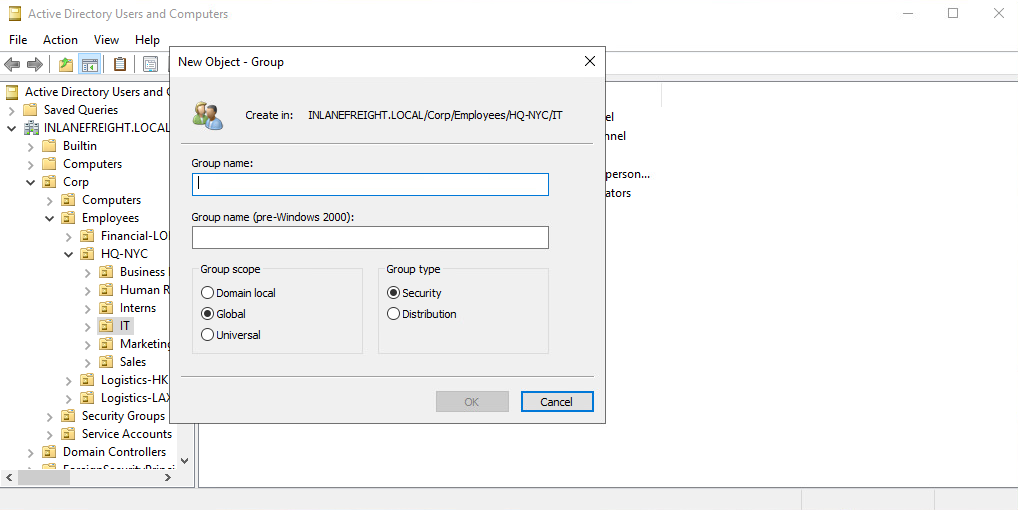
There are two main group types:
Security groupstype is primarily for ease of assigning permissions and rights to a collection of users instead of one at a time. They simplify management and reduce overhead when assigning permissions and rights for a given resource. All users added to a security group will inherit any permissions assigned to the group, making it easier to move users in and out of groups while leaving the group’s permissions unchanged.Distribution groupstype is used by email applications such as Microsoft Exchange to distribute messages to group members. They function much like mailing lists and allow for auto-adding emails in the “To” field when creating an email in Microsoft Outlook. This type of group cannot be used to assign permissions to resources in a domain environment.
Group Scopes
There are three different group scopes:
- Domain Local Group
- Global Group
- Universal Group
Domain Local Group
Domain local groups can only be used to manage permissions to domain resources in the domain where it was created. Local groups cannot be used in other domains but CAN contain users from OTHER domains. Local groups can be nested into (contained within) other local groups but NOT within global groups.
Global Group
Global groups can be used to grant access to resources in another domain. A global group can only contain accounts from the domain where it was created. Global groups can be added to both other global groups and local groups.
Universal Group
The universal group scope can be used to manage resources distributed across multiple domains and can be given permissions to any object within the same forest. They are available to all domains within an organization and can contain users from any domain. Unlike domain local and global groups, universal groups are stored in the Global Catalog (GC), and adding or removing objects from a universal group triggers forest-wide replication.
It is recommended that administrators maintain other groups (such as global groups) as members of universal groups because global group membership within universal groups is less likely to change than individual user membership in global groups. Replication is only triggered at the individual domain level when a user is removed from a global group. If individual users and computers (instead of global groups) are maintained within universal groups, it will trigger forest-wide replication each time a change is made. This can create a lot of network overhead and potential for issues.
Below is an example of the groups in AD and their scope settings. Please pay attention to some of the critical groups and their scope. ( Enterprise and Schema admins compared to Domain admins, for example.)
AD Group Scope Examples
Active Directory Groups
1
2
3
4
5
6
7
8
9
10
11
12
13
14
15
16
17
18
19
20
21
22
23
24
25
26
27
28
29
30
31
32
33
34
35
PS C:\htb> Get-ADGroup  -Filter * |select samaccountname,groupscope

samaccountname                           groupscope
--------------                           ----------
Administrators                          DomainLocal
Users                                   DomainLocal
Guests                                  DomainLocal
Print Operators                         DomainLocal
Backup Operators                        DomainLocal
Replicator                              DomainLocal
Remote Desktop Users                    DomainLocal
Network Configuration Operators         DomainLocal
Distributed COM Users                   DomainLocal
IIS_IUSRS                               DomainLocal
Cryptographic Operators                 DomainLocal
Event Log Readers                       DomainLocal
Certificate Service DCOM Access         DomainLocal
RDS Remote Access Servers               DomainLocal
RDS Endpoint Servers                    DomainLocal
RDS Management Servers                  DomainLocal
Hyper-V Administrators                  DomainLocal
Access Control Assistance Operators     DomainLocal
Remote Management Users                 DomainLocal
Storage Replica Administrators          DomainLocal
Domain Computers                             Global
Domain Controllers                           Global
Schema Admins                             Universal
Enterprise Admins                         Universal
Cert Publishers                         DomainLocal
Domain Admins                                Global
Domain Users                                 Global
Domain Guests                                Global

<SNIP>
Group scopes can be changed, but there are a few caveats:
- A Global Group can only be converted to a Universal Group if it is NOT part of another Global Group.
- A Domain Local Group can only be converted to a Universal Group if the Domain Local Group does NOT contain any other Domain Local Groups as members.
- A Universal Group can be converted to a Domain Local Group without any restrictions.
- A Universal Group can only be converted to a Global Group if it does NOT contain any other Universal Groups as members.
Built-in vs. Custom Groups
Several built-in security groups are created with a Domain Local Group scope when a domain is created. These groups are used for specific administrative purposes and are discussed more in the next section. It is important to note that only user accounts can be added to these built-in groups as they do not allow for group nesting (groups within groups).
Some examples of built-in groups included Domain Admins, which is a Global security group and can only contain accounts from its own domain. If an organization wants to allow an account from domain B to perform administrative functions on a domain controller in domain A, the account would have to be added to the built-in Administrators group, which is a Domain Local group.
Changes/additions to an AD environment can also trigger the creation of additional groups.
For example, when Microsoft Exchange is added to a domain, it adds various different security groups to the domain, some of which are highly privileged and, if not managed properly, can be used to gain privileged access within the domain.
Nested Group Membership
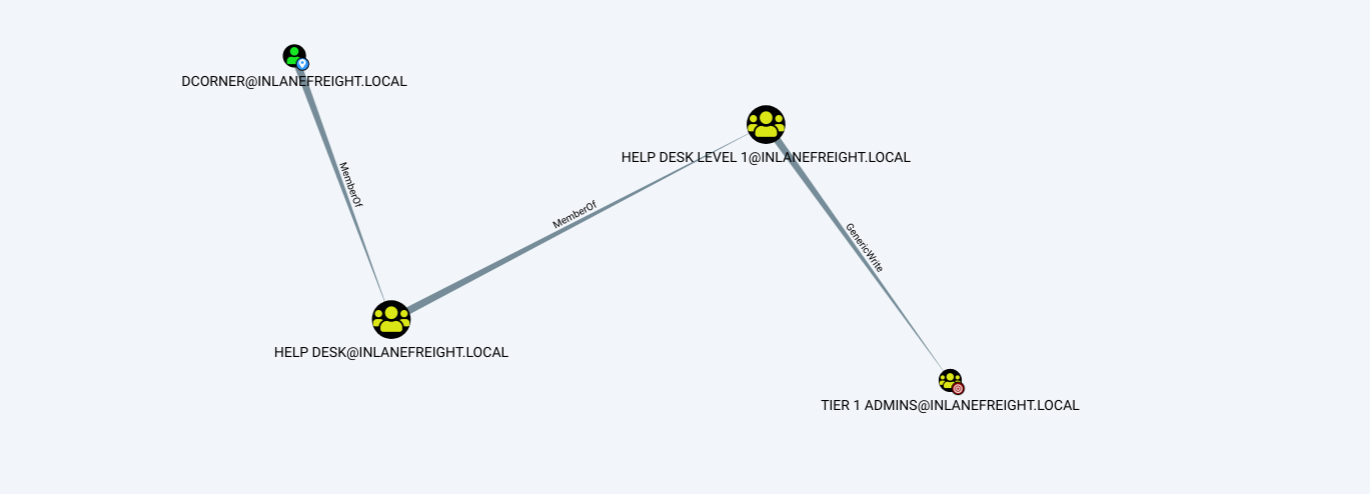
Nested group membership is an important concept in AD. As mentioned previously, a Domain Local Group can be a member of another Domain Local Group in the same domain. Through this membership, a user may inherit privileges not assigned directly to their account or even the group they are directly a member of, but rather the group that their group is a member of. This can sometimes lead to unintended privileges granted to a user that are difficult to uncover without an in-depth assessment of the domain. Tools such as BloodHound are particularly useful in uncovering privileges that a user may inherit through one or more nestings of groups. This is a key tool for penetration testers for uncovering nuanced misconfigurations and is also extremely powerful for sysadmins and the like to gain deep insights (visually) into the security posture of their domain(s).
Below is an example of privileges inherited through nested group membership. Though DCorner is not a direct member of Helpdesk Level 1, their membership in Help Desk grants them the same privileges that any member of Helpdesk Level 1 has. In this case, the privilege would allow them to add a member to the Tier 1 Admins group (GenericWrite). If this group confers any elevated privileges in the domain, it would likely be a key target for a penetration tester. Here, we could add our user to the group and obtain privileges that members of the Tier 1 Admins group are granted, such as local administrator access to one or more hosts that could be used to further access.
Examining Nested Groups via BloodHound
Important Group Attributes
Like users, groups have many attributes. Some of the most important group attributes include:
cn: Thecnor Common-Name is the name of the group in Active Directory Domain Services.member: Which user, group, and contact objects are members of the group.groupType: An integer that specifies the group type and scope.memberOf: A listing of any groups that contain the group as a member (nested group membership).objectSid: This is the security identifier or SID of the group, which is the unique value used to identify the group as a security principal.
Groups are fundamental objects in AD that can be used to group other objects together and facilitate the management of rights and access. Take the time to study the differences between group types and scopes. This knowledge is useful for administering AD as well as understanding the relationships between groups in the same and different domains and what information can be enumerated during the recon phase of a penetration test. Understanding how different group types can be utilized to perform attacks in a single domain and across trust boundaries is an excellent bit of knowledge to have. We deep-dived into Groups in this section, now let’s examine the differences between Rights and Privileges.