AD Trusts & Structure
Introduction
Active Directory (AD) is a directory service for Windows network environments. It is a distributed, hierarchical structure that allows for centralized management of an organization’s resources
AD provides authentication and authorization functions within a Windows domain environment. A directory service, such as Active Directory Domain Services (AD DS) gives an organization ways to store directory data and make it available to both standard users and administrators on the same network. AD DS also includes:
- A set of rules, the schema, that defines the classes of objects and attributes contained in the directory, the constraints and limits on instances of these objects, and the format of their names. For more information about the schema, see Schema.
- A global catalog that contains information about every object in the directory. This allows users and administrators to find directory information regardless of which domain in the directory actually contains the data. For more information about the global catalog, see Global catalog.
- A query and index mechanism, so that objects and their properties can be published and found by network users or applications. For more information about querying the directory, see Searching in Active Directory Domain Services.
- A replication service that distributes directory data across a network. All domain controllers in a domain participate in replication and contain a complete copy of all directory information for their domain. Any change to directory data is replicated to all domain controllers in the domain. For more information about Active Directory replication, see Active Directory Replication Concepts.
AD is essentially a large database accessible to all users within the domain, regardless of their privilege level. So a basic AD user account with no added privileges can be used to enumerate the majority of objects contained within AD, including but not limited to:
| Domain Computers | Domain Users |
|---|---|
| Domain Group Information | Organizational Units (OUs) |
| Default Domain Policy | Functional Domain Levels |
| Password Policy | Group Policy Objects (GPOs) |
| Domain Trusts | Access Control Lists (ACLs) |
Structure
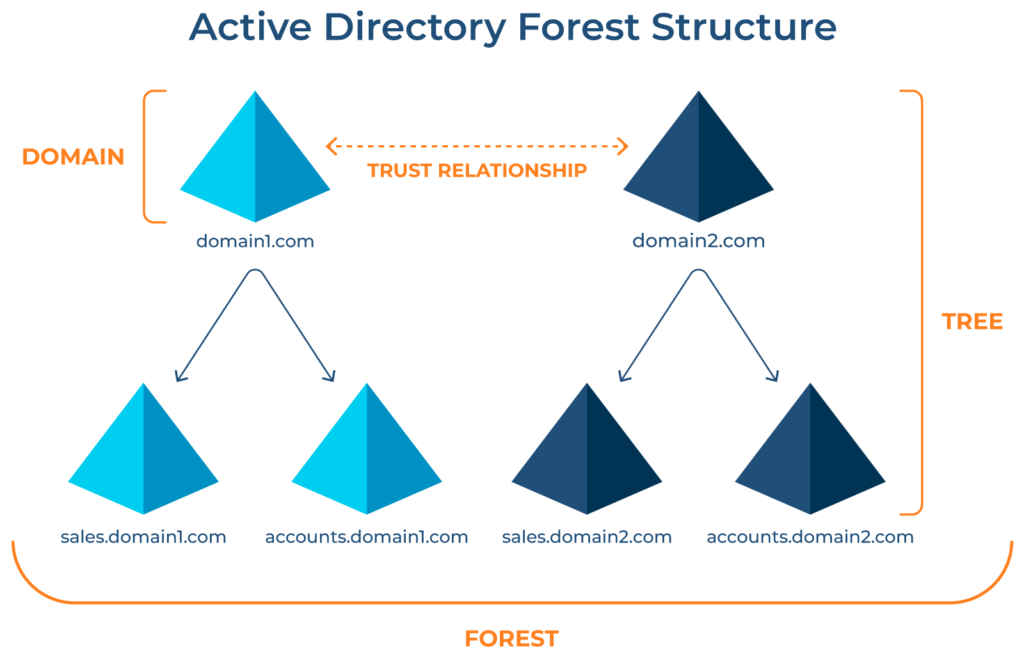
- Active Directory is arranged in a hierarchical tree structure, with a forest at the top containing one or more domains, which can themselves have nested subdomains
- A forest is the security boundary within which all objects are under administrative control. A forest may contain multiple domains, and a domain may include further child or sub-domains
- A domain is a structure within which contained objects (users, computers, and groups) are accessible:
- It has many built-in Organizational Units (OUs), such as
Domain Controllers,Users,Computers, and new OUs can be created as required. OUs may contain objects and sub-OUs, allowing for the assignment of different group policies
- It has many built-in Organizational Units (OUs), such as
At a very (simplistic) high level, an AD structure may look as follows:
1
2
3
4
5
6
7
8
9
10
11
12
13
INLANEFREIGHT.LOCAL/              #root domain, containing multiple subdomains (either child or tree root domains)
├── ADMIN.INLANEFREIGHT.LOCAL
│   ├── GPOs
│   └── OU
│       └── EMPLOYEES
│           ├── COMPUTERS
│           │   └── FILE01
│           ├── GROUPS
│           │   └── HQ Staff
│           └── USERS
│               └── barbara.jones
├── CORP.INLANEFREIGHT.LOCAL
└── DEV.INLANEFREIGHT.LOCAL
Trusts
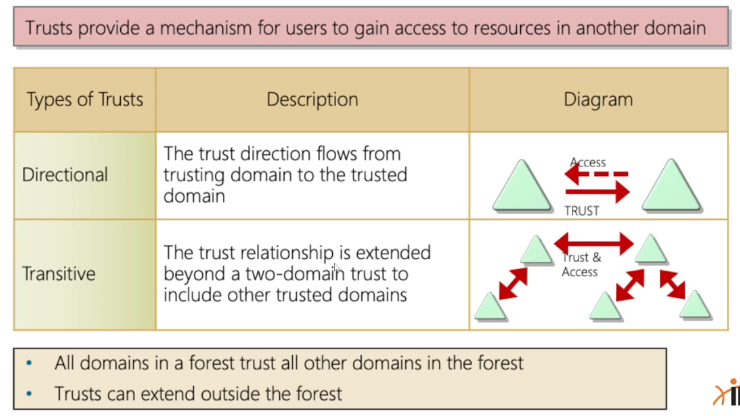
It is common to see multiple domains (or forests) linked together via trust relationships in organizations that perform a lot of acquisitions. It is often quicker and easier to create a trust relationship with another domain/forest than recreate all new users in the current domain. As we will see in later modules, domain trusts can introduce a slew of security issues if not appropriately administered.
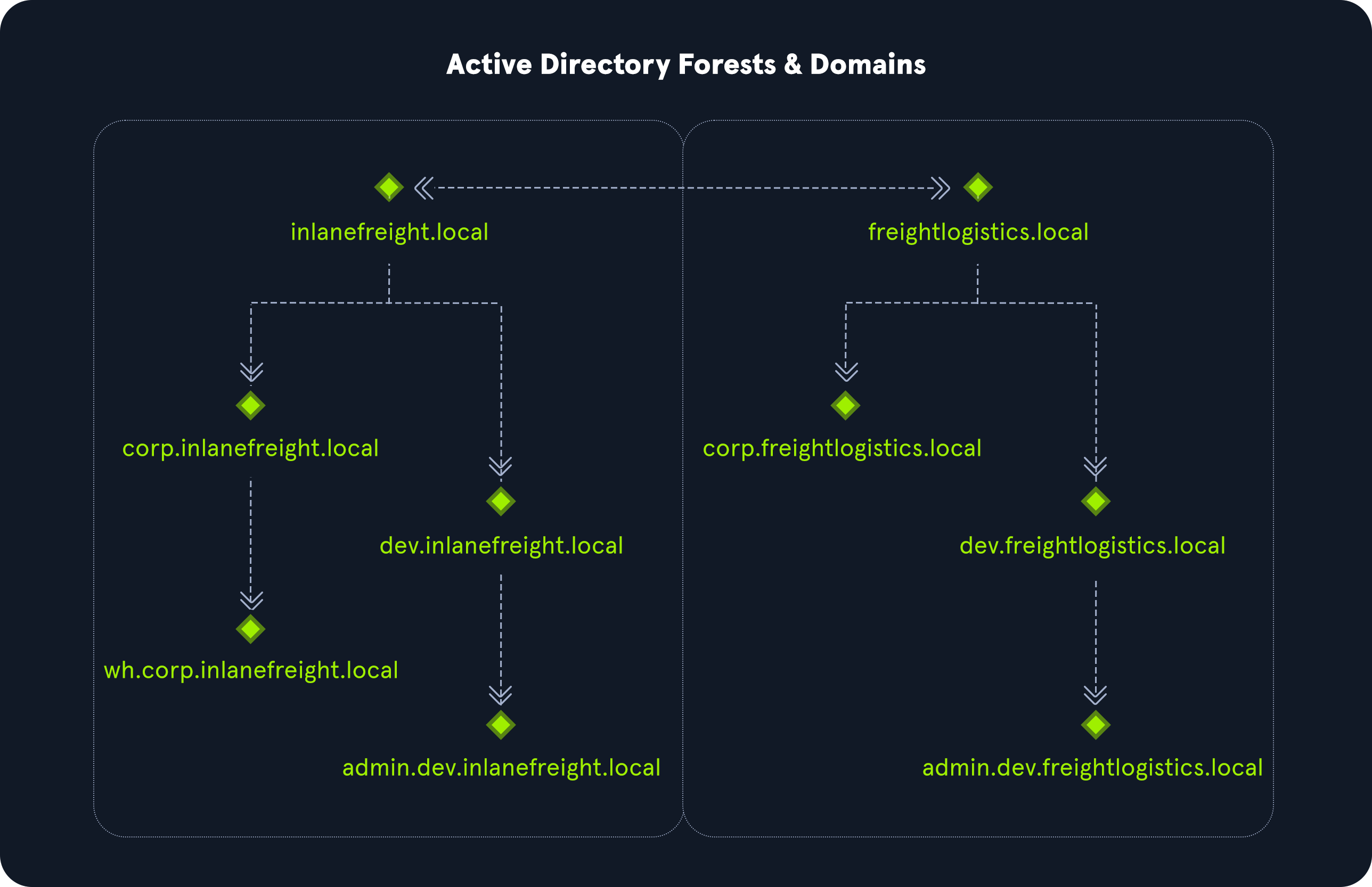
The graphic above shows two forests, INLANEFREIGHT.LOCAL and FREIGHTLOGISTICS.LOCAL. The two-way arrow represents a bidirectional trust between the two forests, meaning that users in INLANEFREIGHT.LOCAL can access resources in FREIGHTLOGISTICS.LOCAL and vice versa. We can also see multiple child domains under each root domain.
In this example, we can see that the root domain trusts each of the child domains, but the child domains in forest INLANEFREIGHT.LOCAL do not necessarily have trusts established with the child domains in forest FREIGHTLOGISTICS.LOCA.
This means that a user that is part of admin.dev.freightlogistics.local would NOT be able to authenticate to machines in the wh.corp.inlanefreight.local domain by default, even though a bidirectional trust exists between the top—evel INLANEFREIGHT.LOCAL and FREIGHTLOGISTICS.LOCAL domains.
!!! To allow direct communication from admin.dev.freightlogistics.local and wh.corp.inlanefreight.local, another trust would need to be set up !!!