Kerberos, DNS, LDAP, MSRPC
Active Directory specifically requires Lightweight Directory Access Protocol (LDAP), Microsoft’s version of Kerberos, DNS for authentication and communication, and MSRPC which is the Microsoft implementation of Remote Procedure Call (RPC), an interprocess communication technique used for client-server model-based applications.
Kerberos
Kerberos is a stateless authentication protocol based on tickets instead of transmitting user passwords over the network.
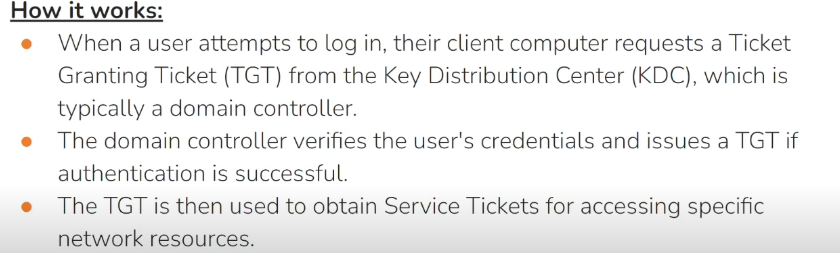
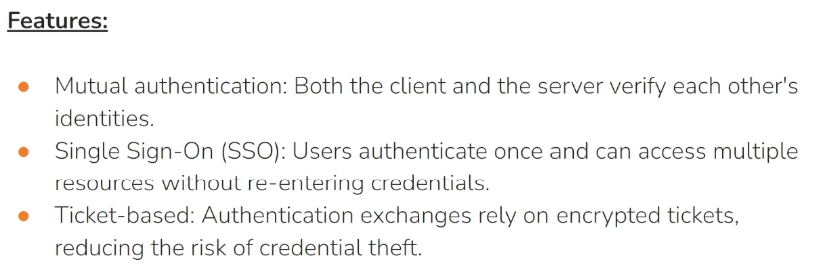
As part of Active Directory Domain Services (AD DS), Domain Controllers have a Kerberos Key Distribution Center (KDC) that issues tickets.
Kerboeros works with 3 main components:
- Security Principal
- Key Distribution Center (KDC) that offers:
- Authentication service
- Ticket granting service
- Resource Destination Server:
Kerberos Authentication Process
Encryption keys
There are several structures handled by Kerberos, as tickets. Many of those structures are encrypted or signed in order to prevent being tampered by third parties. These keys are the following:
- KDC or krbtgt key: which is derivate from krbtgt account NTLM hash.
- User key: which is derivate from user NTLM hash.
- Service key: which is derivate from the NTLM hash of service owner, which can be an user or computer account.
- Session key: which is negotiated between the user and KDC.
- Service session key: to be use between user and service.
Tickets structure
TGT : {session key (SK1) to talk to TGS, client ID, client network address, timestamp, lifetime}
ST: {service session key (SK2) to talk to the service, timestamp, lifetime, some additional info}
Process
- Security Principal authentication to KDC: When a user logs in, their password hash is used to encrypt a timestamp and the user’s User Principal Name (UPN), which is sent to the Key Distribution Center (KDC) to verify the integrity of the authentication by decrypting it.
The KDC then issues a Ticket-Granting Ticket (TGT), encrypting it with the krbtgt key. This TGT is used to request service tickets for accessing network resources, allowing authentication without repeatedly transmitting the user’s credentials. This process decouples the user’s credentials from requests to resources.
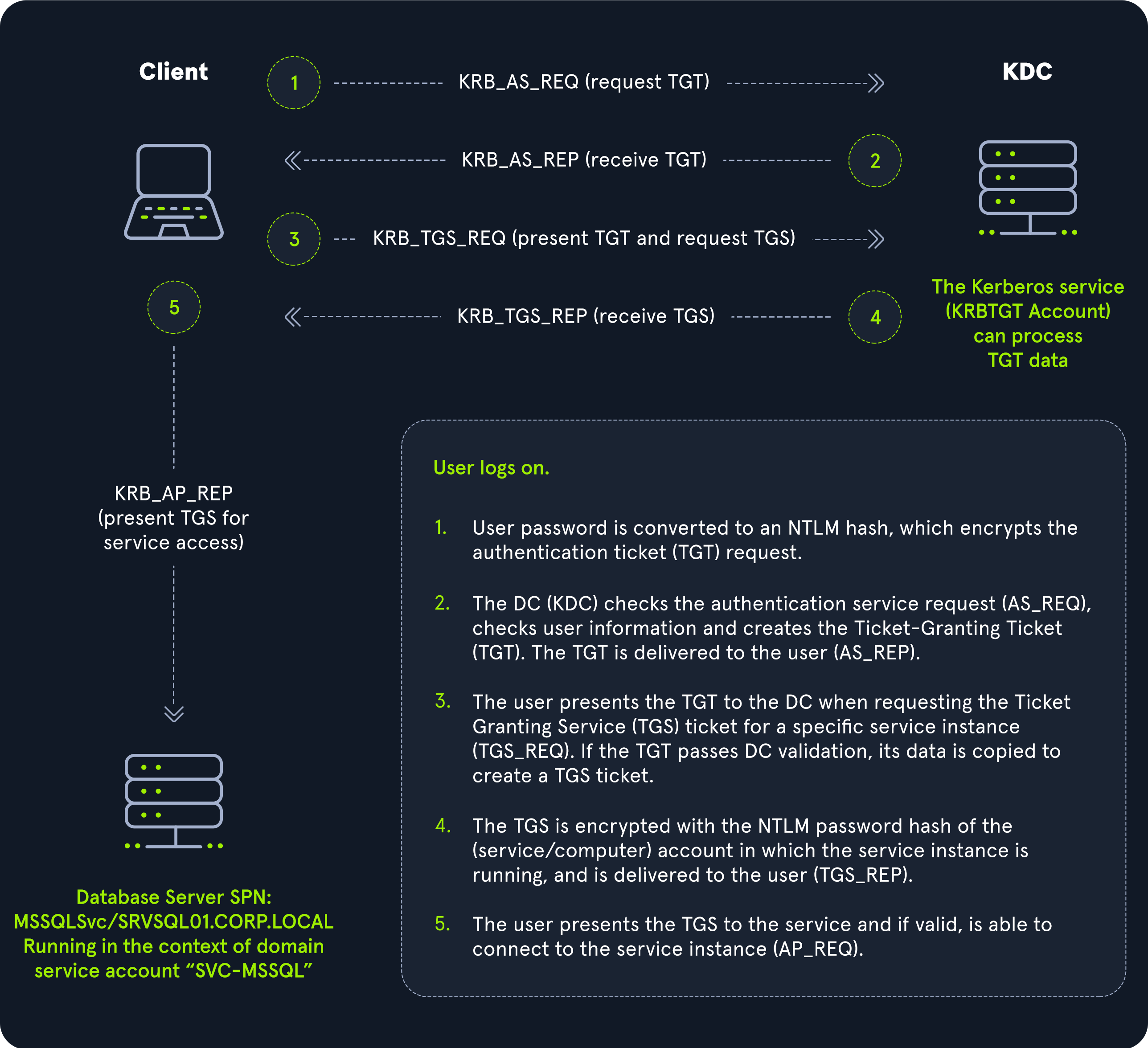
- KDC TGT generation and assignment: The KDC service on the DC checks the authentication service request (AS-REQ), verifies the user information, and creates a Ticket Granting Ticket (TGT), which is delivered to the user encrypted with the ‘krbtgt’ account’s long-term key. TGT includes user identity information in a PAC (Privilege Attribute Certificate).
- KDC ST generation: The user presents the TGT along with a request that includes the SPN for the service it wants to access to the KDC, requesting a Service Ticket (ST) ticket to talk to the service. This is the TGS-REQ. If the TGT is successfully validated (match with previously sent TGT), its data is copied to create a TGS ticket.
- Security Principal receive encrypted ST: The ST is encrypted with the service key of the service instance is running and is delivered to the user in the TGS_REP.
Security Principal ask access to Destination Resource Server: The user presents the ST to the service.
- KDC previously shared key to decrypt ST to the Destination Resource Server
- The Destination Resource Server decrypt the ST
- The Destination Resource Server ask a copy of that ticket to the KDC
- if the two ST match, than request is valid and the user is permitted to connect to the resource (AP_REQ).
The Kerberos protocol uses port 88 (both TCP and UDP). When enumerating an Active Directory environment, we can often locate Domain Controllers by performing port scans looking for open port 88 using a tool such as Nmap.
The Kerberos Key Distribution Centre (KDC) does not record previous transactions. Instead, the Kerberos Ticket Granting Service ticket (TGS) relies on a valid Ticket Granting Ticket (TGT). It assumes that if the user has a valid TGT, they must have proven their identity.
Additional Info:
- KDC uses Network Time Protocl (NTP) to sync the time, this is done because the TGT needs to expire in 5 minutes to prevent replay attack
- TGS typically expires in 8-10h
- When a user log in a Kerberos security realm, the event ID is 4768
- The security principal or user never has the keys to encrypt the tickets, only KDC and Destination Server has them
- Keys are stored in the Curb Tray, which is a non-readable area of memory
- Key length is crucial for Kerberos as too long keys will affect network performance, while too short will augment risk of bruteforce attack
- Kerberos main weakness is his trust on users passwords
- KDC is a single point of failure, so to mitigate this you will need multiple KDCs
https://www.tarlogic.com/blog/how-kerberos-works/
Taming Kerberos - Computerphile
DNS
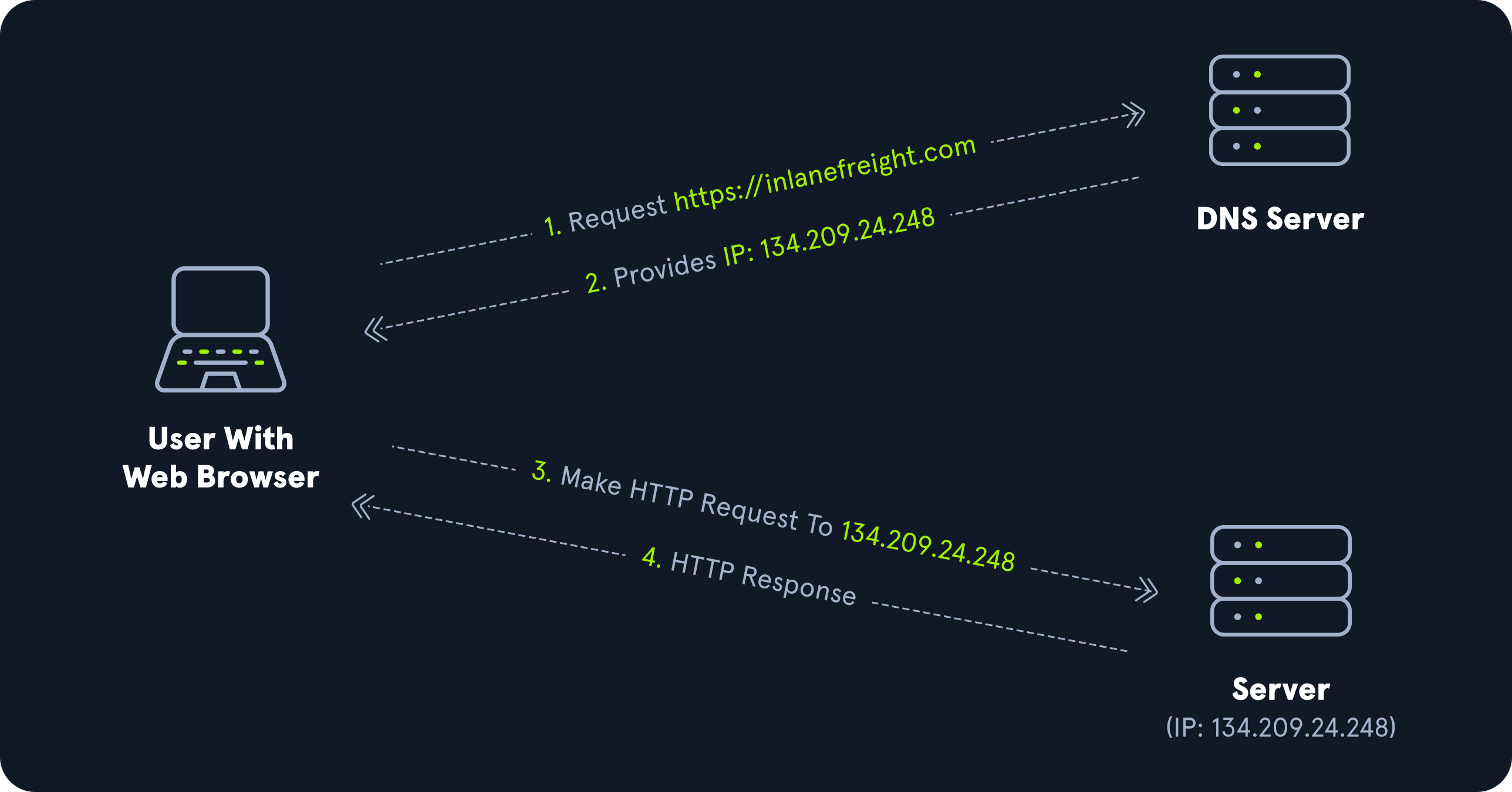
Active Directory Domain Services (AD DS) uses DNS to allow clients (workstations, servers, and other systems that communicate with the domain) to locate Domain Controllers and for Domain Controllers that host the directory service to communicate amongst themselves.
AD maintains a database of services running on the network in the form of service records (SRV). These service records allow clients in an AD environment to locate services that they need, such as a file server, printer, or Domain Controller.
Dynamic DNS is used to make changes in the DNS database automatically should a system’s IP address change. Making these entries manually would be very time-consuming and leave room for error.
DNS uses TCP and UDP port 53. UDP port 53 is the default, but it falls back to TCP when no longer able to communicate and DNS messages are larger than 512 bytes.
Forward DNS Lookup
Let’s look at an example. We can perform a nslookup for the domain name and retrieve all Domain Controllers’ IP addresses in a domain.
1
2
3
4
5
6
7
PS C:\htb> nslookup INLANEFREIGHT.LOCAL

Server:  172.16.6.5
Address:  172.16.6.5

Name:    INLANEFREIGHT.LOCAL
Address:  172.16.6.5
Reverse DNS Lookup
If we would like to obtain the DNS name of a single host using the IP address, we can do this as follows:
1
2
3
4
5
6
7
PS C:\htb> nslookup 172.16.6.5

Server:  172.16.6.5
Address:  172.16.6.5

Name:    ACADEMY-EA-DC01.INLANEFREIGHT.LOCAL
Address:  172.16.6.5
Finding IP Address of a Host
If we would like to find the IP address of a single host, we can do this in reverse. We can do this with or without specifying the FQDN.
1
2
3
4
5
6
7
PS C:\htb> nslookup ACADEMY-EA-DC01

Server:   172.16.6.5
Address:  172.16.6.5

Name:    ACADEMY-EA-DC01.INLANEFREIGHT.LOCAL
Address:  172.16.6.5
LDAP
Active Directory supports Lightweight Directory Access Protocol (LDAP) for directory lookups. LDAP is an open-source and cross-platform protocol used for authentication against various directory services (such as AD). The latest LDAP specification is Version 3, published as RFC 4511. A firm understanding of how LDAP works in an AD environment is crucial for attackers and defenders. LDAP uses port 389, and LDAP over SSL (LDAPS) communicates over port 636.
AD stores user account information and security information such as passwords and facilitates sharing this information with other devices on the network. LDAP is the language that applications use to communicate with other servers that provide directory services. In other words, LDAP is how systems in the network environment can “speak” to AD.
An LDAP session begins by first connecting to an LDAP server, also known as a Directory System Agent. The Domain Controller in AD actively listens for LDAP requests, such as security authentication requests.
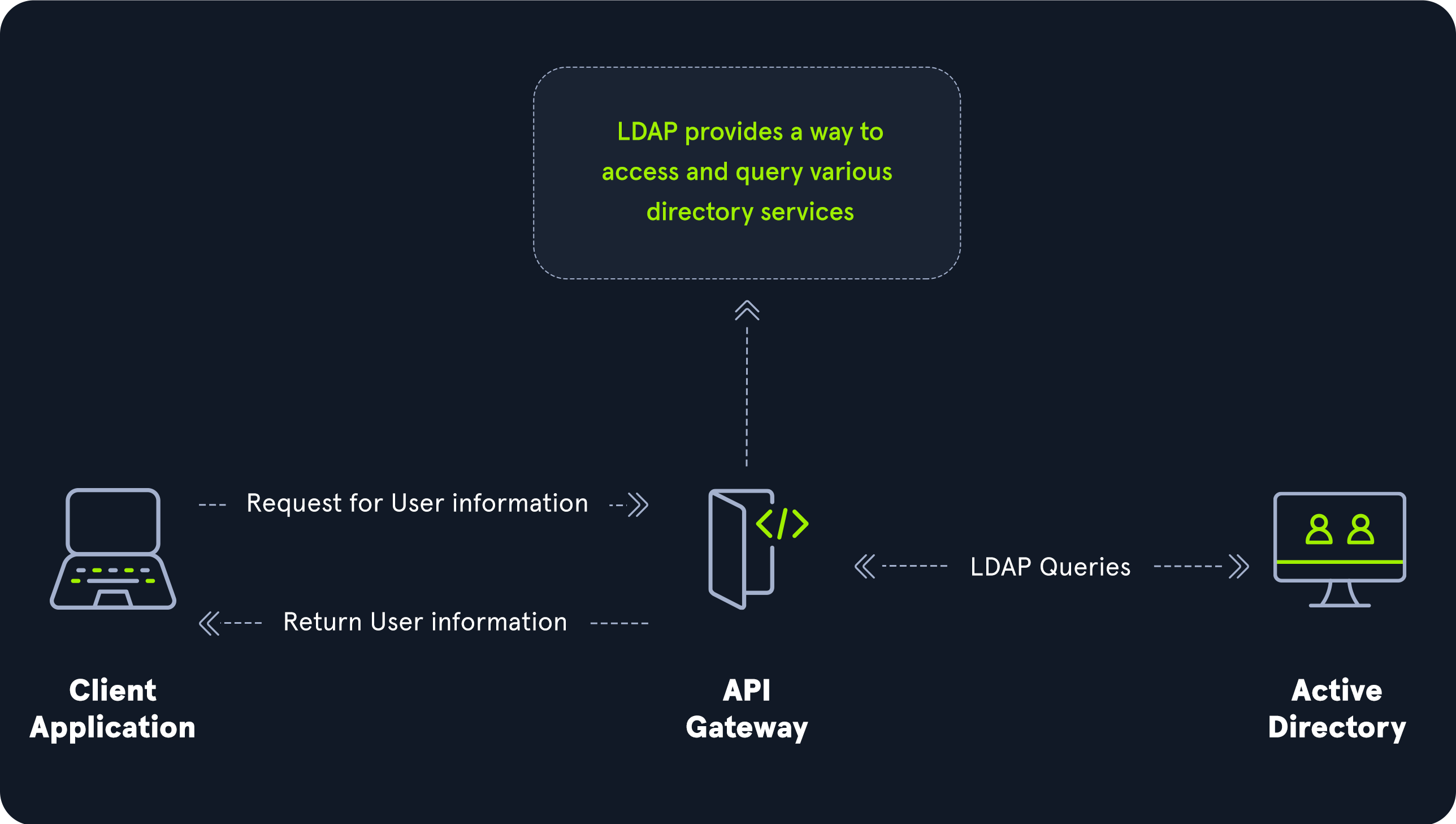
The relationship between AD and LDAP can be compared to Apache and HTTP. The same way Apache is a web server that uses the HTTP protocol, Active Directory is a directory server that uses the LDAP protocol.
While uncommon, you may come across organization while performing an assessment that do not have AD but are using LDAP, meaning that they most likely use another type of LDAP server such as OpenLDAP.
AD LDAP Authentication
LDAP is set up to authenticate credentials against AD using a “BIND” operation to set the authentication state for an LDAP session. There are two types of LDAP authentication.
Simple Authentication: This includes anonymous authentication, unauthenticated authentication, and username/password authentication. Simple authentication means that ausernameandpasswordcreate a BIND request to authenticate to the LDAP server.SASL Authentication: The Simple Authentication and Security Layer (SASL) framework uses other authentication services, such as Kerberos, to bind to the LDAP server and then uses this authentication service (Kerberos in this example) to authenticate to LDAP. The LDAP server uses the LDAP protocol to send an LDAP message to the authorization service, which initiates a series of challenge/response messages resulting in either successful or unsuccessful authentication. SASL can provide additional security due to the separation of authentication methods from application protocols.
LDAP authentication messages are sent in cleartext by default so anyone can sniff out LDAP messages on the internal network. It is recommended to use TLS encryption or similar to safeguard this information in transit.
MSRPC
As mentioned above, MSRPC is Microsoft’s implementation of Remote Procedure Call (RPC), an interprocess communication technique used for client-server model-based applications. Windows systems use MSRPC to access systems in Active Directory using four key RPC interfaces.
| Interface Name | Description |
|---|---|
lsarpc | A set of RPC calls to the Local Security Authority (LSA) system which manages the local security policy on a computer, controls the audit policy, and provides interactive authentication services. LSARPC is used to perform management on domain security policies. |
netlogon | Netlogon is a Windows process used to authenticate users and other services in the domain environment. It is a service that continuously runs in the background. |
samr | Remote SAM (samr) provides management functionality for the domain account database, storing information about users and groups. IT administrators use the protocol to manage users, groups, and computers by enabling admins to create, read, update, and delete information about security principles. Attackers (and pentesters) can use the samr protocol to perform reconnaissance about the internal domain using tools such as BloodHound to visually map out the AD network and create “attack paths” to illustrate visually how administrative access or full domain compromise could be achieved. Organizations can protect against this type of reconnaissance by changing a Windows registry key to only allow administrators to perform remote SAM queries since, by default, all authenticated domain users can make these queries to gather a considerable amount of information about the AD domain. |
drsuapi | drsuapi is the Microsoft API that implements the Directory Replication Service (DRS) Remote Protocol which is used to perform replication-related tasks across Domain Controllers in a multi-DC environment. Attackers can utilize drsuapi to create a copy of the Active Directory domain database (NTDS.dit) file to retrieve password hashes for all accounts in the domain, which can then be used to perform Pass-the-Hash attacks to access more systems or cracked offline using a tool such as Hashcat to obtain the cleartext password to log in to systems using remote management protocols such as Remote Desktop (RDP) and WinRM. |